In many rigs, multiple computers are used, and they need to talk to each other. For example, one computer handles the imaging, another the electrophysiology, and yet another handles the sensory stimulation; and they all need to be synchronized. There are several ways to handle this.
Digital I/O via DAQs
This is typically the most straightforward solution, but requires that there is some sort of DAQ for each computer. You can use something very simple, like a parallel port interface. Parallel ports are very old fashioned, but they’re still standard issue on most full-sized motherboards (see image above). Wire up the each data pins to a separate BNC and you have an extremely inexpensive digital I/O (the pinout is on Wikipedia and elsewhere on the net). The logic is a TTL-like 0-5v, however, beware that motherboards will vary quite a bit in their logic-high voltage level, and they typically can only source a small amount of current, 10-20 mA. So don’t try to split the signal to a bunch of different devices. (more info).
Alternatively, you can buy an inexpensive USB DAQ. For example, Measurement Computing‘s boxes are supported by MATLAB’s DAQ Toolbox. On that topic, let me briefly mention Dennis Pelli’s excellent MATLAB toolbox for controlling Measurement Computing’s USB-1208FS. It’s one of the simplest ways to do data acquisition in OSX using MATLAB. And be sure to read his explanation about why he programmed it up. It has more to do with the Second Amendment than you might expect. (link)
Ethernet connections
This approach has the advantage of using something that most computers have built in: an ethernet port. There are several protocols that ride on IP networks. You’re probably most familiar with TCP, but only slightly less well known is this: UDP. This is the protocol used for DNS queries. This is a leaner, faster way to send short messages to synchronize computers in an experimental setup. It’s not as tight as using a direct pulse to a DAQ, but it’s fast enough for most applications. The big advantage is that it’s pretty simple to send configuration data in addition to a simple trigger pulse via UDP. Several scientific software packages directly support UDP (e.g., here’s MATLAB’s UDP function).
Single computer solution
Getting programs to talk to each other
Even when a single computer is used, there may be multiple programs that need to talk to each other. In the first intrinsic imaging rig I built, I wrote my own OpenGL-based visual stimulation program which ran on the same computer as the imaging software (pdf). Both programs were written in C++ using Visual Studio. In order to get the two computers to talk to each other, I used custom Windows messages. Most modern operating systems have a messaging system where individual processes can send and receive messages. I was able to use this to pass messages between the two programs. If you want to do the same thing, and are already comfortable dealing with Windows messages in C++, this link can get you started.
Quick OSX tip: if you’re finding that your OSX system is quite busy even though you haven’t asked anything of it, check to see if the processes “mds” and “mdworker” are chewing up CPU cycles (view active processes in Activity Monitor).
If so, then this is Spotlight indexing your hard drive. If it seems excessive, try going into System Preferences -> Spotlight -> Privacy and adding your whole hard drive. This will stop Spotlight from indexing it and everything should calm down for a while. After a few minutes, take your whole hard drive off of Privacy so that Spotlight will index it again.
This process seems to solve over-indexing problems of Spotlight. It will index a bit once you take your hard drive off of Privacy, but it will index a normal amount, instead of hours and hours on end. I’ve had this problem on several machines, especially when migrating to a new system or installing a new hard drive.
BTW, this process will not make Spotlight work better. It’ll still take forever to find anything useful. But at least its indexing won’t be destroying your battery life.
Here are some relatively pain-free instructions to get NEURON to run with Python support on OS X.
1. Install XCode 3.x. XCode 4 will not work (*). You can get it from an OS X
installation CD/DVD, or from the Apple Developer Connection (requires an account).
2. Install the free version of the Enthought Python Distribution (version 7.1.1, 32 bit) from here.
3. Install Eilif Muller’s NEURON package from here.
Use “Mac OS X >=10.5 NEURON 7.1 Installer built against EPD 7.1.1, build 1 (beta/testing)”
4. Test from a terminal (located in Applications/Utilities):
Baudline software (Linux/OSX) is free software for analyzing the spectral components of signals. It’s really well-made and has a lot of features. This can be useful for analyzing LFPs, audio recordings, or even tracking down the noise on a rig. Xcorr uses Baudline to view long neural recordings.
You probably caught the article about the group who runs their laser-trapping experiments using an app they wrote for iOS on the iPad. This sparked a commentary about apps in science. What about some other apps for handheld and tablet computing?
Reference organization
In general, when it comes to organization, the system is only as good as it is regularly used. In order to ensure that it’s used regularly, it needs to be very simple and require almost no energy on the part of the user. Both of the apps below have iOS versions available, as well as their main versions. For many, being able to catch up on reading using a tablet or handheld device while still having access to their entire database will be very attractive. It’s an alternative to a stack of papers or a laptop/desktop.
Papers
This is an OSX/iOS-only program. The recently released version 2 of this program represents a huge rewrite. This software has a great look-and-feel, a ton of well-thought-out features, and support for both handheld and tablet computers (as long as they run iOS). It’s $79. (review by Ars Technica)
Mendeley
This one is free. It’s also cross-platform (Linux, Windows, and OSX). There’s also an iPhone app for it. In addition to the organization features you’d expect, Mendeley pioneered a social network aspect to reference management that is now being copied by other outfits. Their huge database is the subject of a $10,001 application development contest currently running. (review by Ars Technica)
Lab management
Wikis and purchasing databases are useful tools for managing a lab. Several online tools like collaborative calendars and are easily usable through any web interface, including tablets and handhelds, while others have dedicated apps for these other platforms.
BioKM
The commentary from Nature Photonics I mentioned earlier took the opportunity to mention a sister company, Digital Science, which making some interesting software. Their lab management tool, BioKM, has an iPad app interface. It’s looks like it could be useful. Unfortunately, it’s an expensive piece of subscription software, $85-$320 per month (that’s $3840 per year at the top end). Plus, being cloud-based, security may be an issue, especially for labs that deal with patient/human volunteer data. (Their FAQ reads “Learn more about BioData’s security policy here.” And then offers no link.) Sharp-eyed viewers of their tour screencasts will note that the software doesn’t look entirely different from a customized wiki. Most of which are completely free and can be run from your own servers. Maybe it’s worth the price somehow.
Reference material
As you might imagine, there are far too many to mention here. And honestly, the utility isn’t always clear. Most of the info is as easily available from a browser+search engine. But here are a couple I feel like listing.
There are others, including offerings from QIAGEN, Promega, and New England Biolabs. They’re all fairly well done and have useful features. But some of these are a bit too wide in scope, for my taste anyways. If I need a molecular biology protocol for something I haven’t done before, my research will be a bit more in depth than simply following the recipe my iPhone app has to offer.
Other scientific apps
XPP
This is Bard Ermentrout’s program for solving systems of ordinary differential equations and related problems. Ashutosh Mohan ported it to iOS. Nice!
iCircuit
This is a circuit simulator. If you feel like your iPad’s battery life is a little too impressive, try to get some work done with this puppy. oScope
Uses the audio in as input and offers oscilloscope and spectrum analyzer views. Not as versatile as the other iOS-based scopes covered previously, but sometimes useful. LabTimer
Does what it says on the tin. Unlike the built-in iPhone timer app, this one has 4 fully functional, independent lab-type timers. Molecules
An excellent molecule viewer. Acceleration 3D Detector – Lets you record data from the accelerometers in the device. Handy for measuring vibrations on rigs.
A new, super bright fluorescent protein that blows the doors off of GFP-based proteins.
Bright, far-red dyes with huge 2p cross-sections.
Higher S:N genetically-encoded voltage and calcium sensors.
Better fluorescent dyes for calcium, sodium, and chloride.
I know we’ll see important steps in one or more of these areas.
Technical equipment
Molecular Devices updates the software for their patch clamp amplifiers, and makes the new pCLAMP ABF data file format open source.
Seriously.
High-speed 3D AOD scanning goes mainstream.
It’ll happen. But I’m not sure how much progress we’ll see this year.
Mathworks releases a native version of MATLAB for OSX.
This won’t happen– they’re more likely to abandon OSX altogether– but we can hope. I do all my analysis via Remote Desktop already, but sometimes it’s nice to have it running locally.
Software
Better open source data analysis with Python
Many neuroscientists have been programming different applications in Python: visual stimuli, neuronal models, psychophysics experiments, electrophysiology data acquisition, etc. However, until there is an organized package for programming GUIs, controlling DAQs, and doing data analysis with Python, MATLAB, Igor Pro, and other commercial programs will dominate. Eclipse is a nice package, don’t get me wrong, but it’s not going to get most people to switch from MATLAB or LabView.
This is just a quick post to highlight a few Mac OSX programs & tips that you might find useful.
Programs
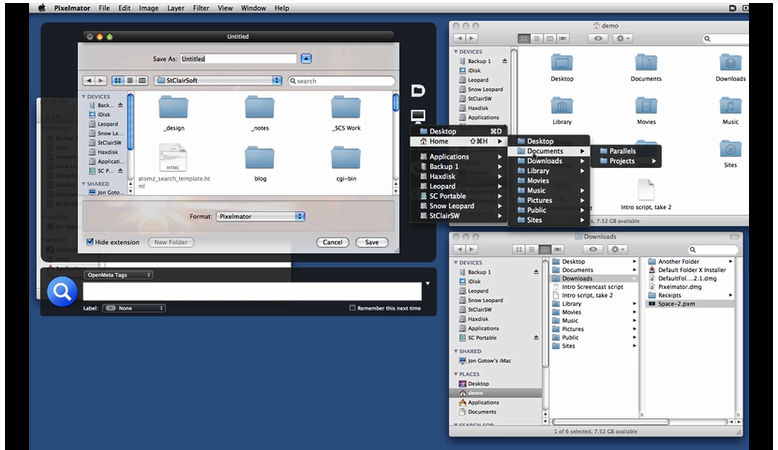
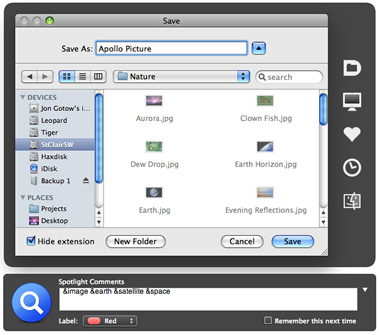
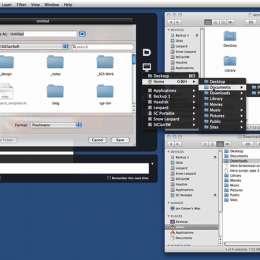
Default Folder – This is how all save file dialogs should work. Watch the video. They have a free demo you can try. I bought it and am always happy at all the clicking and navigating it spares me. It also makes it very easy to add tags to saved files so that they will be easier to find using Spotlight. It also shows previews of files as you’re browsing in an open file dialog.
Numbers – An oft forgotten part of iWork. I use it to make up experiment data sheets to fill in, and to organize data. Its big advantage over Excel, as far as I’m concerned, is that it’s fast and easy to make custom page layouts that are clear and fit the different data types.
Postbox – This one is available for Windows and OSX. I like Gmail’s conversation view. Postbox is the closest I’ve found to it in a standalone mail program. It also handles tabs, which helps to reduce window clutter. Postbox lets you browse through images or other files completely separately from the messages they were originally attached to. I like this feature a lot because many times the original message had only an attachment, no subject or message body.
Typinator – I use this to speed up answering emails and other typography characters. For example, when I type “;;so” it is automatically expanded into a full sign off, with my name and affiliation. I also use it for little typographic things, such as Greek letters and the degree symbol. You can also set it up to insert formatted text and even images.
Tips
Pages (part of iWork) works with the latest versions Endnote. You don’t have to use Word.
Vector figures from PDF files viewed in Preview can be copied and pasted into Pages documents and they stay vectorized.