Posts tagged with equipment

Last Monday, Labrigger covered HelioScan, a LabVIEW-based, two-photon laser scanning microscopy software suite.

Marcel van ‘t Hoff (left) and Dominik Langer (right) are the two main developers of HelioScan. They were kind enough to answer some interview questions for Labrigger.

LR: Are there special considerations you had to make when designing HelioScan? What measures did you take in LabVIEW to support the level of modularity?
The main design considerations were to design for future flexibility and for multiple developers to easily collaborate without interfering. The idea was then to assemble the software at run-time from components that are dynamically loaded based on configuration settings. LabVIEW classes are the ideal candidates for such components:

First, they naturally bundle data and corresponding VIs into separate entities.

Second, LabVIEW allows to load and instance classes at run-time based on the class file path (which can be specified in a configuration file).

Third, using class inheritance and polymorphy, we can substitute any two components, as long as interacting other classes refer to them in terms of the same abstract base class. For example, a particular ScanHead component can handle any incoming Trajectory component as long it is a subclass of a particular expected abstract base class.

Fourth, by means of aggregation combined with the above principles, we can build up highly complex objects at run time.
An example: HelioScan may read from its main configuration file to load a particular ImagingMode. During its initialization, the loaded ImagingMode object reads its own configuration file, stating that – among other components – a particular ScanHead component is to be loaded. Once loaded, the ScanHead object reads a configuration guiding it to load a bunch of Scanner components of a particular type, etc.

A couple of others have implemented individual components, demonstrating that the distributed multideveloper scenario is working.

LR: In the near future, say 5 years, who will be maintaining the core HelioScan codebase and leading new developments?
We are currently in a transition phase. First, both Marcel and I just left Fritjof Helmchen’s lab. While Marcel is going to continue as a postdoc in the field and will still use HelioScan, I will leave the academic field. Second, we are currently working on a major new version of HelioScan that we expect to bring about another quantum leap in flexibility. The new version will be based on a framework for distributed cross-platform signal processing (Murmex) that we are developing. We have been developing this framework in our free time and plan to continue doing so. Murmex as the new core will allow HelioScan components to be written not only in LabVIEW, but various other well-known programming languages. We believe that this will lower the entry barrier for new developers enough for HelioScan to become a project that can be handed over to the community. New components will be collected on a central repository, given that they meet some basic quality standards. This will be similar to certain ImageJ distributions, such as FIJI.

LR: Do you have design principles that you follow to ensure that your LabVIEW programs don’t become spaghetti?
First, we try to stick as far as possible the style rules from “The LabVIEW Style Book” (Peter A. Blume, Prentice Hall) [Also covered here. -Labrigger]. That’s also the book we usually recommend to newcomers before they start to develop their own components.

Second, HelioScan is implemented using LabVIEW object-oriented programming (LVOOP), which naturally already structures the code by bundling related data and functionality into LabVIEW classes.

Third, we made very good experiences with the so-called XControls of LabVIEW. XControls are your own, re-usable user interface controls, which can provide arbitrarily complex functionality. For example, we made an XControl that allows to load and display multi-page TIFF files, where the user can scroll through the frames, draw different types of ROIs, load and save ROI seletions, and display file meta-information. On the VI block diagram, this whole functionality is represented by a single terminal, hiding all the underlying complexity from the developer.

Fourth, we heavily use a couple of design patterns to do certain things.

Fifth, the HelioScan framework enforces a lot of structure. When we develop a new component, we subclass an abstract class of the framework and override some of its methods. For example, when we need a new scan pattern for galvanometric mirrors, we subclass a generic Trajectory class. We override (among others) the initialise method of the class and put the code initialising the pattern exactly there (and nowhere else).

Read the rest of this entry »

Both the Arduino and the Raspberry Pi (pictured above) are stand-alone computing devices, have an array of expansion boards available, open source software, and either one can be purchased for about $30. However, the Arduino is a microcontroller, while the the Raspberry Pi is a full, modern computer– not as powerful as a laptop, but in some ways similar to a first generation Xbox.

Raspberry Pi homepage
Raspberry Pi wiki
Raspberry Pi expansion boards

Optics Planet has a nice selection of inexpensive microscopes and other lab equipment. Such as these chubby, potential Cute Overload stars from Nikon (above, the blue one that is taking a bow is $380).

Braintree Scientific also has a really nice selection of reasonably priced equipment. Tons of very interesting, unique products. Get the catalog and flip through it– the website isn’t so nice to browse. They do custom work too, in case you have something specific in mind. One of their new products is a netbook+syringe pump package, pictured below:

I recognize the syringe pump as one of New Era’s OEM pumps. New Era sells all kinds of syringe pumps, from barebones OEM devices ($500, controlled via RS-232), to digital ($750) and multi-syringe units ($1500). You can use one of the OEM units for things like delivering water rewards in behavior rigs.

0 comments

Thorlabs’ B-scope

Thorlabs’ scope pieces and kits have been mentioned in these pages before. At SfN, they had their new B-scope on display. This is like the Sutter MOM and the UCLA scope, in that the microscope rotates in one plane in addition to x-y-z movement. A few differences with the Thorlabs scope:

1. The objective rotates around the focal plane, and the rotation is motorized.
With the Sutter/UCLA style scopes, the objective rotates about an axis along the scan path, so the focus point changes a ton when rotating. The rotation can really only be changed before there is a prep on there, because the objective swings a big arc whenever the rotation changes and it ends up pointing at a completely different point in space.

By contrast, the Thorlabs scope is set up to rotate about an axis that is in the plane of focus. So you can be looking at a cell and then, while imaging, rotate the scope (since it’s motorized) and still keep looking at the same thing, just from a different angle.

This is why they have the crazy periscope you can see to the right in the photo below.

I remember seeing a scope with this same feature (rotation around an axis in the image plane) at a conference at least 2 years ago. I think it was a group based out of Switzerland. Can anyone fill in the details for me?

2. No conventional scanners, just the Thorlabs conventional scanners.
This might not be true for long. Thorlabs has their own conventional scanners, but they’re not as fast as Cambridge Technologies (CTI) scanners. This is probably why they opted to put their resonant scanners in the system.

I’m guessing that they’ll help out buyers if they want to fit the scope with a set of conventional scanners from CTI. I say this because Thorlabs told more than one person at SfN that they would help them fit the Thorlabs resonant scanner kit to their Sutter MOM scope. This was news to Sutter.

Sensapex is the new kid on the block for micromanipulators, and theirs have an ultra small footprint with 20mm of travel on 3 axes. Here are some pictures of one of the first production runs:

To change pipettes, the manipulators have a tilt-back action.

The tilt-back action should help conserve space in crowded setups, but the arc might not be clear. Some sort of sliding back and/or twisting motion might be needed.

They’re very small. Check out the Axon headstage next to them.

It’s really built to be a pipette holder-type manipulator rather than a larger, headstage holder-type manipulator. They have magnetic and bolt-on headstage mounting options for Axon, Heka, and npi.

They have a “high load” version that should handle 200g (the MultiClamp headstage is about 90g). So it should be possible to mount about any headstage directly on the manipulator. Having the headstage too far away from the pipette can cause noise problems, so this might be what people want to look for.

Here’s the controller:

They’re also considering releasing the user interface as open source. This is from Mikko, the CEO:

We are using PC-software in the R&D and testing, but we don’t yet have computer interface for the customers. We have had some requests for it though so it is in our R&D plan. However, we are happy to provide drivers, function calls etc. if someone wants to implement control to their existing software (Matlab, C or Labview based). I’ve been thinking of going for the open-source approach for the user-interface software.

I’ve used Wescor Vapro osmometers for a long time. Specifically, the model pictured above. They’re nice machines. But now I think freezing point osmometers are better. In this post I’ll talk about why.

The Wescor Vapro machines are the only game in town when it comes to vapor pressure osmometers (due to patent issues). It used to be that freezing point osmometers were priced 30% or more over their vapor pressure cousins. This let the Wescor machines take over significant market share. However, recently that price gap has narrowed. This is the new Wescor.

The technology is the same. But now they’ve added more consumables (and more stuff that can break). Wescor also informed me that they’ve redesigned the thermocouple enough (even though the tech and specs are the same) that they are going to stop supporting the older model and will not sell replacement parts in the future.

With that in mind, the relative merits of the two technologies should be re-evaluated.

1. Freezing point osmometers offer more reproducible and reliable measurements
Vapro machines have to coddled in order to be reliable. Daily recalibration is common. They’re very sensitive to ambient temperature and humidity. By contrast, freezing point osmometers are tanks. Their measuring mechanism is pretty violent compared to vapor pressure osmometers (there’s a loud bang when a measurement is made), but the signal to noise is so high that they still nail their measurements under challenging conditions. The freezing point measurement is simply more robust and higher signal-to-noise than the vapor pressure measurement.

Check out this machine. It looks WWII surplus. But you can yank it out of deep storage, run three 290 mosm standards in series, and it nails 290 all three times. It’s the Jeep of osmometers.

2. Less maintenance
I haven’t much experience with freezing point osmometers, so for the comparison I’m relying on the testimony of my colleagues. But as I mentioned at the beginning of this post, I have a lot of experience with the Wescor Vapro. Cleaning the thermocouple, replacing the thermocouple, sending it back to the factory for repair… the machines I’ve used have needed all of this. The freezing point machines need maintenance, but it’s markedly less than the Vapros.

3. Wescor isn’t what it used to be
EliTech bought Wescor in 2007. So Wescor, naturally, is not the same company.

If freezing point osmometers are better than vapor point osmometers, why did all the labs I trained in have the vapor point osmometers. One reason: price. Vapor point osmometers used to be 30% cheaper. But now they’re not. And given the advantages of freezing point osmometers, it’s worth reconsidering.

The Fiske, above, is great, but a bit loud even when in standby. This one’s quieter.

9 comments

DIY Heat pad

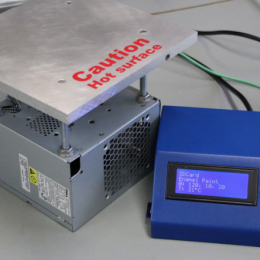
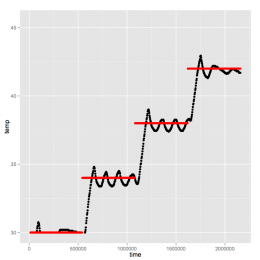
More cleverness from Taro Ishikawa. Instead of buying a homeothermic heating pad for surgeries (these often cost > $1000), Taro used some basic industrial process control items. He bought his stuff in Japan, but similar items are available from McMaster-Carr in the US.

Part 1
A Precision Programmable Temperature PID Controller, about $200 (shown at top of post)
(Example McMaster-Carr item: 38615K71)
This connects to a temperature probe and a heating element to maintain a pre-set temperature. They’re built with fairly robust feedback algorithms and logic to maximize stability.

Part 2
A temperature probe, about $20
(Example McMaster-Carr item: 9251T91)
Pretty basic.

Part 3
A heating pad, about $50
These are available in a variety of sizes.
(Example McMaster-Carr item: 35475K722)

Just make sure all the parts are electrically compatible. Depending on which ones you select, you may also need a power supply. (The standard Labrigger disclaimer applies.)

3 comments

DIY Picospritzer

I was in Tokyo recently and stopped by my friend Taro Ishikawa’s lab (of TaroTools fame). He and Misa are doing very well. They have exciting work underway and are expanding their lab. Taro’s a resourceful, clever guy and while I was there I saw some more of his handiwork. Instead of buying a Picospritzer (which costs $1500-$3000, the NPI PDES system is less expensive, but still in the 4 digits), Taro hooked a regulator (above) directly to an electric valve (below) and called it a day. The valve is actuated by a TTL pulse, and the regulator sets the pressure. Simple, elegant, saves space, and saves money.

OpenMoCo is short for “Open Motion Control”. The community is focussed on building rigs for moving cameras.

They have great, detailed, accessible articles on different topics including gearing, motors, and their own software and hardware. They also list several good hardware sources.

It is maybe not a replacement for pipette micromanipulators. However, for stages, microscope platforms, and motorized mechanisms in behavior rigs, this could be a great resource for a custom made solutions.

The have forums too. It’s not the most active community, but it seems to have a steady pace. And perhaps if they broadened their scope a bit, there would be an increase in activity. The infrastructure itself seems very general. Here’s a diagram:

(via)

A while back Labrigger covered some sources for alternative mechanics. Here’s a new one. MakerBeam is an inexpensive kit of construction rails aka T-slot bars. This would be a great thing to keep around the lab to construct various riggings. A $130 kit from SparkFun gets you all this:

  • 4x – 30cm beam
  • 8x – 20cm beam
  • 6x – 15cm beam
  • 16x – 10cm beam
  • 8x – 6cm beam
  • 8x – 4cm beam
  • 12x – outside corner bracket
  • 12x – 45 degree bracket
  • 12x – 60 degree bracket
  • 24x – 90 degree bracket
  • 1x – bag of bolts
  • 1x – bag of nuts
  • The MakerBeam system’s best feature may be that the angle brackets are labeled with their angle in turns, a somewhat less used unit than degrees or radians. It doesn’t really matter (1 turn = 360 degrees, obviously), but it quickly ignited an impassioned discussion in the comments of the product page.

    Here’s an excerpt:

    Haha, oh open source. Only you would do something helpful like engrave the angle in each bracket, but render it useless by using some obscure unit…

    (via)
    More Optomechanics Resources