Posts tagged with analysis

There are several MATLAB-related items to post, but individually they don’t amount to much, so I’ll just put them all together.

Outside of MATLAB Central, there are a lot of places to find useful MATLAB code and commentary. In particular, some labs have excellently curated MATLAB toolboxes and are willing to share with their friends. So ask around. No need to reinvent the wheel.

As far as what’s publicly available, I’ve stumbled across a couple that have been handy. Blogger Stinkpot writes very brief notes on MATLAB sporadically. Items include Moving the X-axis to the top of a plot and Inserting a MATLAB matrix in to LaTeX.

Peter Acklam offers a nicely organized list of MATLAB utilities. Although some of the functions are quite old and are now included in MATLAB natively (e.g. the Kronecker tensor product), others are fairly unique and may be useful to you. There are also somewhat obscure things like trigonometric functions using gradians (e.g. cosgrad).

Xcorr has had a couple of excellent posts recently on some perhaps obscure MATLAB functions. There is an excellent explanation and demo for each function. Highly recommended. Xcorr’s coverage of memmapfile and bsxfun.

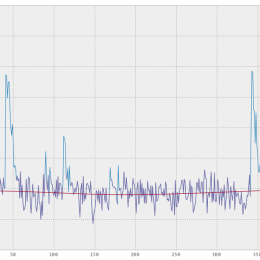
Finally, you might be interested in GPU computing with MATLAB. AccelerEyes‘ Libjacket is finally 1.0 (link). This uses NVIDIA hardware to accelerate MATLAB computations. The graph at the top of this post compares the performance of their software running on an NVIDIA Tesla C2050 to an alternative, CPU-based acceleration technology (Intel’s Math Kernel Library). Academic research has found similar advantages (link).

A paper on data organization just came out in Nature Methods (Millard et al. 2011, commentary by Swedlow et al.). They believe, as do I, that using XML schema to organize data is a good way to simplify automated analysis. For the primary container, they use HDF5. Fun fact for all the MATLAB users in the audience (from Tim at Imperial College):

The .mat file format is simply an HDF5 file with a pointless header prepended.

They call the XML metadata+HDF5 data combos “SDCubes”, for Semantically typed Data hyperCubes. Why cubes? That suggests that they are the same size along all axes, which they probably aren’t. If you don’t like hyperrectangle, you can use orthotope. One point that is lost in the figure I put above is the idea that the axes do not have to be continuous. There can be gaps and jumps. There can also be piles of data that all share one point on an axis, if that suits the data.

I like this approach because it is very general and simple. It consists of two file formats that are already being used by many researchers. In a way, the authors didn’t “create” anything. Hopefully this paper will give the strategy some added credibility and help to standardize it. Then people can concentrate on developing tools for working with data in this system, rather than developing new formats all the time.

Xcorr has some nice posts on coding, Plexon systems, analysis, and whatnot. It was just added to the Recommended Blogs section on the right. Some example posts:
A Plexon C++ API on 64-bit Linux
Using WinBUGS to track RFs
Rotating a histogram in MATLAB

They also share bits of advice such as this gem regarding spike sorting:

If you’re going to run a clustering algorithm then for the love of Christ interpolate your waveforms and align them (see chapter 5, Sahani ’99).

Igor Pro is a data analysis environment specialized for 1D time series data. It has some nice features: it handles data scaling beautifully, it has good built-in help, it generates highly customized and high quality figures, and it’s relatively quick to prototype work flows. It can also be used for data acquisition and machine control. It’s quite popular among electrophysiologists, and I still use it myself.

Here are three free packages for Igor Pro that are handy for electrophysiology.

NeuroMatic

This is by Jason Rothman. It includes support for loading pClamp files, spike detection, event analysis, and all sorts of batch processing. It’s a very thorough kit of analysis tools. (link)

Taro Tools

Written by Taro Ishikawa, this is the best event analysis software I’ve ever used. I’ve used it for spikes, post synaptic potentials/currents, and other events. (link)

Power Patch Tools

Power Patch Tools is a nice suite of analysis tools including calculators for buffered calcium concentration and liquid-junction potential. (download)

A new paper in PLoS Computation Biology proposes an elegant formalism for describing neuronal morphology. The reason I’m highlighting it on Labrigger is because the authors have simultaneously released a very extensive, impressive MATLAB toolbox for studying neuronal morphology, including reconstructing neurons from image stacks: the TREES toolbox.

What you’ll find in the TREES toolbox:

o Tools to automatically reconstruct neuronal branching from microscopy image stacks and to generate synthetic axonal and dendritic trees.

o The basic tools to edit, visualize and analyze dendritic and axonal trees.

o Methods for quantitatively comparing branching structures between neurons.

o Tools for exploring how dendritic and axonal branching depends on local optimization of total wiring and conduction distance.

To get an idea of what this toolbox is capable of, look through the extensive manual.